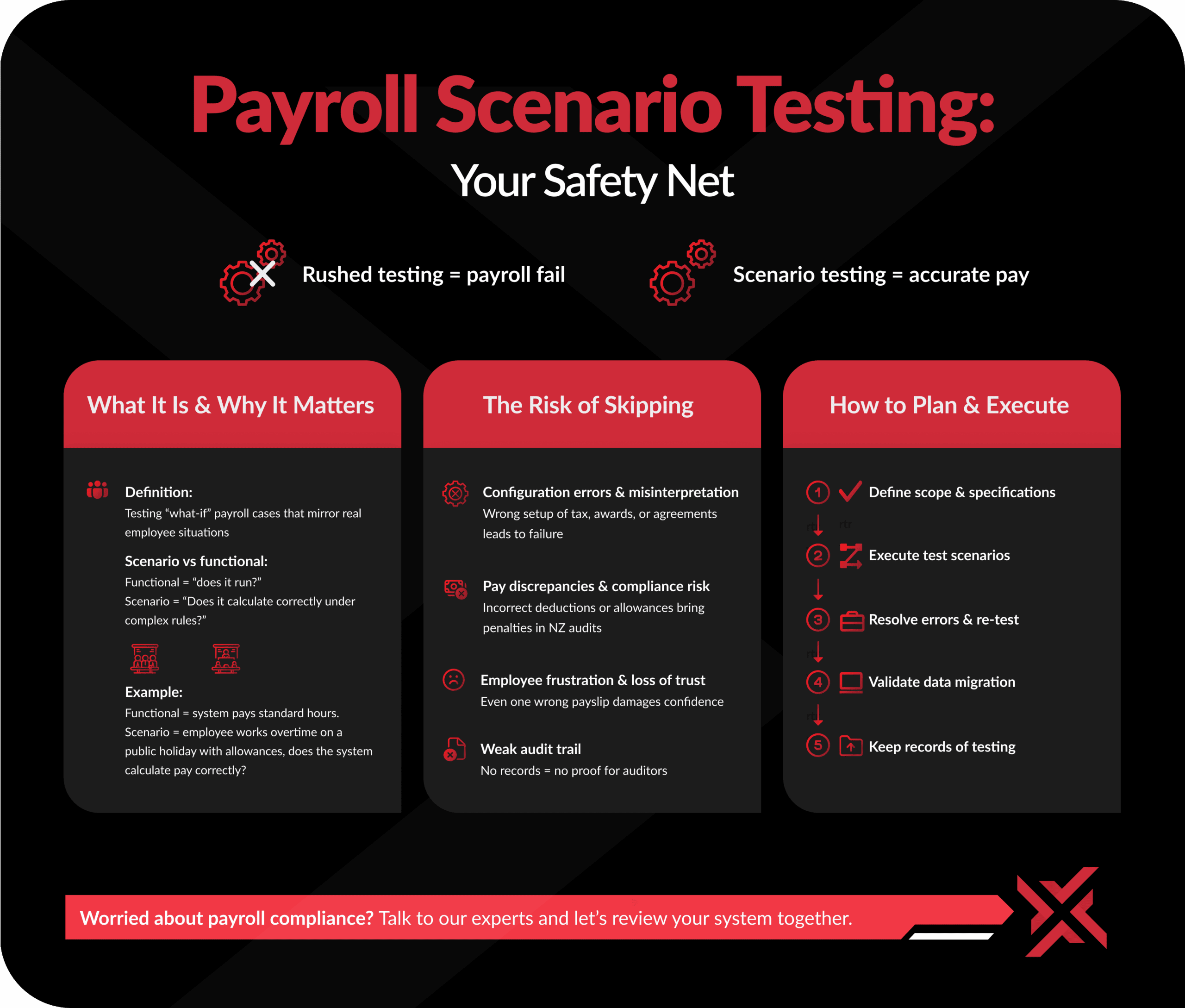


Most payroll projects fail not due to the software, but because testing is rushed or skipped. Scenario testing is the safety net. Without it, mistakes slip through and show up where it hurts most – in employee pay.
What Is Payroll Scenario Testing & Why It Matters
Definition in Payroll Context
Payroll scenario testing means running through “what-if” cases that reflect real workplace situations: different employee types, unusual shifts, allowances, leave rules, and tax variations. It’s more than ticking boxes. It’s proof your system works under pressure.
Scenario vs Functional Testing test cases:
Functional testing checks if a feature runs. Scenario testing checks if it survives complexity. Example: functional testing confirms an employee is paid correctly on a Public Holiday. Scenario testing confirms the employee is paid correctly when working across midnight into a Mondayised Public Holiday at Christmas time.
The Risks of Skipping Payroll Scenario Testing
Configuration Errors & Misinterpretation of Agreements
Every payroll system depends on how it’s configured. If awards, tax tables, or collective agreements are programmed incorrectly, even the most advanced system will fail. Scenario testing highlights those edge cases before they show up in a live pay run.
Pay Discrepancies & Compliance Exposure
Incorrect tax deductions, missed allowances, or misapplied leave rules aren’t just technical errors – they carry compliance risks. In New Zealand, payroll audits are strict, and errors can lead to penalties.
Employee Frustration & Loss of Trust
Employees expect accuracy in every paycheck. Even a single mistake can erode trust in payroll, HR, and leadership. Scenario testing is one of the simplest ways to protect that trust.
Weak Audit Trail
If an auditor asks what was tested and there’s no documentation, the business is exposed. Keeping records of scenario testing provides evidence and accountability.
How to Plan and Execute Payroll Scenario Testing
Step 1: Define What to Test (Scope & Specifications)
Start with a scope or specification document. Collaborate with payroll teams to list every rule that must be tested: pay rates, allowances, deductions, leave entitlements, and tax requirements. Review it carefully, as this blueprint sets the foundation for testing.
Step 2: Create Scenario Test Cases
Build test cases that reflect real payroll complexity, including:
- Wage and salary calculations (different hours and rates).
- Tax calculations across multiple tax codes.
- Allowances and deductions such as night-shift premiums or travel payments.
- Leave entitlements and accruals in line with legislation and contracts.
- Different roster patterns.
- Public holiday payments.
- Employee self-service features.
- Full payroll runs from start to finish.
Include different employee types: full-time, part-time, salaried, hourly, contractors, and casuals.
Step 3: Execute Test Scenarios
Run these test cases in a secure test environment, not live payroll. Compare the results against expected outcomes. This is where mis-configured rules and hidden errors surface.
Step 4: Keep an Issues Register
Document any discrepancies between expected and actual results. Classify whether issues come from system configuration, employment agreement interpretation, or user error. An issues log ensures nothing gets missed.
Step 5: Resolve Errors & Re-Test
Work with your software vendor or implementation partner to fix issues. Once changes are made, re-test the failed scenarios to confirm resolution. Iteration is part of the process.
Step 6: Validate Data Migration
If moving from an old system, validate that all employee data (personal info, tax details, balances, accruals) transferred correctly. Run a mock migration for a subset of employees and manually add test employees to confirm accuracy.
Step 7: Keep Records of Testing
Store results in a shared space accessible to both the client and vendor. This record is useful for audits, future troubleshooting, and stakeholder communication.
Best Practices for Payroll Scenario Testing
- Engage the right people early: Payroll staff, HR, and legal teams know the details that can make or break compliance.
- Use vendor expertise: They understand how the system interprets rules.
- Don’t rush the timeline: Allocate proper time and budget for testing.
- Re-test after every change: Even small config tweaks can affect pay.
- Keep a testing library: Store scenarios for reuse in upgrades or audits.
From Testing to Go-Live and Beyond
Scenario testing doesn’t exist in isolation, it’s part of the wider project lifecycle. After scenarios, payroll teams usually progress to:
- UAT Testing Phase (user acceptance, broader business review).
- Parallel Run Phase (run new and old systems side by side to compare).
- Go Live (switch to new system).
- Post Go Live (monitor closely, fix residual issues).
Skipping steps early on increases the risk of bigger problems at go-live.
Conclusion: Don’t Let Testing Take a Backseat
Payroll errors are costly, both financially and reputationally. Scenario testing isn’t optional, it’s essential. A structured approach ensures your system works as intended, compliance is met, and employees are paid correctly every time. The investment upfront saves time, money, and trust later.
Frequently Asked Questions
What is the difference between functional testing and scenario testing?
Funtional testing checks if features run. Scenario testing simulates real-world conditions to confirm those features hold up under complexity.
How long should payroll scenario testing take?
It varies. Small businesses may need a few days. Enterprises with multiple agreements and rosters may need weeks or even months.
Who should be involved in scenario testing?
Generally Payroll staff, HR and finance. Each brings expertise on compliance and employment rules.
Can small organisations skip scenario testing?
Even small errors cause major issues. Skipping testing exposes businesses to compliance risks and employee disputes.
What tools are best for payroll scenario testing?
Most systems offer sandbox or test environments during implementation. This is where you would execute your test cases. Use issue tracking tools such as Jira, TestRail, Monday.com, or even Excel or SmartSheets